
Skip to main content

How can we help?
Inogen® Rove 6™ screen power and battery symbols and what they mean
Following are the symbols and icons used by the Inogen Rove 6 portable oxygen concentrator to communicate the power and battery status of your concentrator. These icons appear on the control panel screen, and it’s a good idea to familiarize yourself with the symbols, particularly the high-priority alert symbols, so you can immediately take action when you see them.
Inogen Rove 6 battery level indicator symbols
| Symbol(s) | What it means |
|---|---|
 | Battery is empty. |
 | Flashing symbol. Battery has less than 10% charge remaining. |
 | Battery has approximately 40% to 50% charge remaining. |
 | Battery is full. |
 | The battery is fully charged and is charging as necessary to maintain the charge. |
 | Battery is charging with charge level between 60% and 70%. |
 | Battery is charging with charge level less than 10%. |
 | Concentrator is operating from an external power source with no battery present. |
Inogen Rove 6 battery informational symbols
| Symbol(s) | What it means |
|---|---|
 | Battery charging while operating on external power Concentrator is operating on an external power supply and battery is charging. “xx%” represents the percent battery charge (e.g., 86%). |
 | Battery not charging The battery is not charging or when the time remaining is not available from the battery. |
 | Battery charging Concentrator is plugged in and being used to charge a battery (not being used for oxygen production). It is normal to see a fully charged battery read between 95% and 100% when external power is removed. This feature maximizes the useful life of the battery. |
 | Please wait: Shutting down On/Off button has been pressed for two seconds. Concentrator is performing system shut down. |
Inogen Rove 6 high-priority battery alert symbols
| Symbol(s) | What it means |
|---|---|
 | Battery low: Attach plug Concentrator has insufficient battery power to produce oxygen. Attach external power supply or exchange battery, then restart unit if necessary by pressing On/Off button. |
 | Battery HOT Battery has exceeded temperature limit while concentrator is running on battery power. Concentrator has stopped producing oxygen. If possible, move concentrator to a cooler location, then turn power off and back on. Ensure air intake and outlet vents have clear access and particle filters are clean. If condition persists, switch to a backup source of oxygen and contact your equipment provider. |
Inogen Rove 6 low-priority battery alert symbols
| Symbol(s) | What it means |
|---|---|
 | Battery low: Attach plug Battery power is low, with less than 10 minutes remaining. Attach external power supply or power down and insert a fully charged battery. |
 | Check battery Battery error has occurred. Check the connection of your battery and ensure that it is properly attached and latched on concentrator. If battery error recurs with same battery, stop using the battery and switch to a new battery or remove battery and operate concentrator using external power supply. |
 | Remove battery to cool Battery has exceeded its charging temperature and charging has stopped. The battery will not charge while this alert is present but will begin to charge when the battery temperature returns to the normal operating range. If battery charging is desired sooner, remove the battery from the concentrator and allow it to cool in an open area for approximately 10-15 minutes. Then, re-insert the battery into the Inogen One® G5. If the problem still persists, contact your equipment provider. |
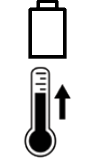 | Battery HOT warning Battery has exceeded temperature limit while concentrator is running on battery power. If possible, move concentrator to a cooler location or power unit with an external power supply and remove battery. If condition persists, contact your equipment provider. |
We carry only genuine parts

Don't risk damaging your machine with 3rd party accessories parts that may not fit properly. We carry all the genuine parts and accessories for your Inogen and Oxygo concentrator. If you can't find a part or accessory on our website, feel free to get in touch with us to help you find what you need.