
2 easy home maintenance tips for your portable oxygen concentrator
In this post, we'll teach you about 2 easy things you can do at home to keep your portable oxygen cocentrator working at its best and give it the best chance for a long life.
Keeping your portable oxygen concentrator in good working condition typically takes just 2 things:
- Keep the external particle filter clean.
- Replace the columns (sieve beds) when needed.
We'll go over what each of these means.
The particle filter
What does the particle filter do?
The external filter, or particle filter, is the screen (or screens if you have an OxyGo 5-Setting or Inogen Gen 3 unit) that you can see on the outside of your portable oxygen concentrator.
These screens keep keep air going into your concentrator clean by filtering out dirt, dust, pet hair, and dander.

Why it's important to keep the particle filter clean
It's important to keep your particle filter clean because a clogged or dirty filter makes your portable oxygen concentrator work harder to pull in air to concentrate. Prolonged strain on your concentrator could potentially cause it to or overheat and shorten its life.
A dirty filter might also mean fine dust and dander getting into the unit, which could affect its performance over time.
How often should you clean the particle filter?
Particle filters only need to be cleaned when they're dirty. It's a good idea to make a habit of checking your filter regularly to make sure it's clean, especially before you leave home for a long day out or a trip.

How to clean your particle filter
If your oxygen concentrator has a metal screen filter, you can easily clean it yourself at home using the following steps.
This process applies to portable OxyGo, OxyGo FIT, OxyGo NEXT, Inogen Gen 3, Inogen Gen 4, and Inogen Gen 5 units available from Oxygen Parts Inc.
- Turn off the concentrator.
- Disconnect the power or remove the battery.
- Carefully remove the particle filter from the unit using the plastic pull tabs on the frame of the filter.
- Gently clean the screen using one or both of the following methods:
- Sweep dust and hair off the screen with a dry brush
- Rinse the screen with warm, soapy water
- Gently dry the particle filter; be careful not to damage or bend the wires.
- When the filter is dry, put it back on the unit.
- Reconnect the power or put the battery back in.
- Turn the concentrator back on.
If your particle filter is damage or defective, click here to order replacement particle filters.
Note: Some oxygen concentrator models have felt fabric filters, which will need to be replaced. Contact the company you purchased the concentrator from to ask about replacement filters.
The columns or sieve beds
What do the columns or sieve beds do?
The columns, or sieve beds, on your oxygen concentrator are what concentrates air into medical-grade oxygen, which makes them vital for your health and safety. It's important that you pay attention to indications that your columns need replacing and don't put off ordering the replacement columns.

How often do you need to change the columns (sieve beds)?
The following information applies to all the models we carry here at Oxygen Parts Inc.: OxyGo, OxyGo FIT, OxyGo NEXT, Inogen Gen 3, Inogen Gen 4, and Inogen Gen 5.
The expected life span of columns on the models we carry is 1 year.
How to tell when you need to change the columns
Most modern concentrator models have a display on the unit that alerts you when the columns need to be replaced. The unit which will display some sort of message or icon to indicate that the columns need to be replaced.
If you're not sure what the error codes, icons, or messages on your unit mean, refer to your user manual or contact the company you purchased the unit from.
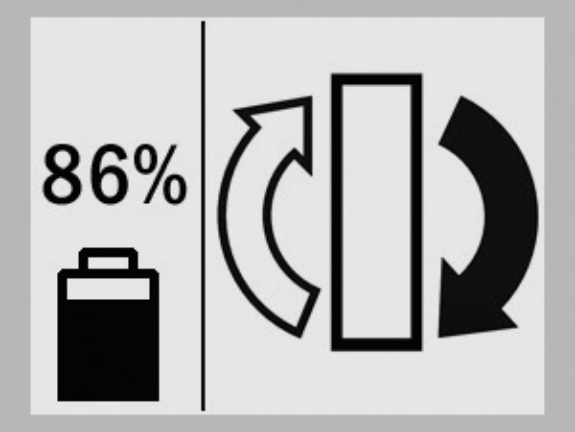
When this message appears, it means that the columns need to be replaced withint 30 days. For your safety, we recommend changing the columns within 2 weeks of the time the message first appears. If you own one of the models listed above, click here to order replacement columns from Oxygen Parts.
How to replace your columns (sieve beds)
To replace the columns on your oxygen concentrator, refer to the column change procedure outlined in your user manual.
We carry only genuine parts

Don't risk damaging your machine with 3rd party accessories parts that may not fit properly. We carry all the genuine parts and accessories for your Inogen and Oxygo concentrator. If you can't find a part or accessory on our website, feel free to get in touch with us to help you find what you need.
We're here to help
If you need help choosing the right concentrator for your lifestyle or finding the right parts or accessories for your exisiting concentrator, don't hesitate to contact us.